Excel is a useful general purpose tool for analysing experimental data. The standard built in charts are fine for X-Y graphs and most common office and administrative work. However, there are only a few options for displaying two dimensional bulk data and the plots cannot handle large datasets very well.
This addin provides a fast way to convert your 2-D table of data into an image for rapid interpretation. A large table of signal intensities against X-Y coordinate, or against time and channel number is much easier to review when converted to an intuitive grey scale or false colour bitmap image. The image may also be exported as a Windows bitmap. The addin is simple to use and will convert a range into a false colour image, and provides a choice of scaling and false colour maps to assist in rapid data interpretation.
A basic demonstration and trial version is available which will handle data up to a maximum of 100 pixel images, and requires data prescaled to 0-255. The registered version will handle any range on a worksheet, and includes options to convert raw data using linear or logarithmic scaling as well.
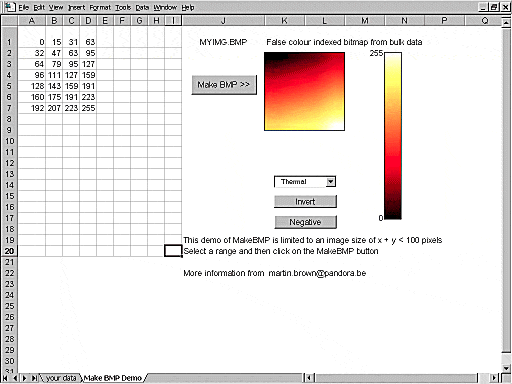
This is a screen dump of the demonstration spreadsheet IMAGE.XLS showing a small array of numeric data converted into an image using the popular thermal colour map.
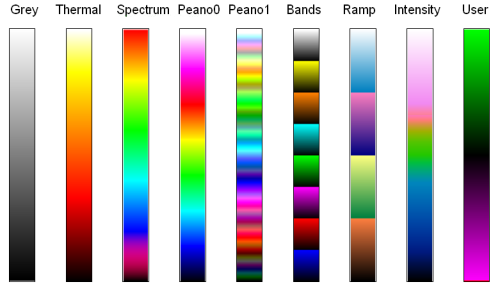
There are several possible false colour maps which may be used:
Here is an example of time resolved mass spectrometry data, using a spectral false colour mapping for signal levels from 1 to 100MHz with logarithmic scaling.

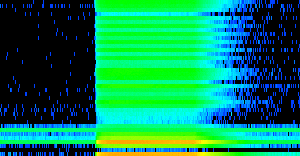
A picture is worth a thousand words, but the main advantage here is that the image allows you to see at a glance the entire dataset of 40 masses and 500 timeslices.
If you want to see more of your bulk data please download the demonstration program IMAGER.XLS for Excel 97 or IMAGER_XL.XLS for Excel 2000,2003 or XP and if you find that it will do what you want the registered version is available for GBP 15 (US $30 or Euro 25). The trial version is limited to images up to 50x50 pixels.
Please contact Martin Brown for ordering details.

